
Late Night Sellerpedia
LOGIN
Once you’ve registered, you keep your seller number and password, so start by LOGGING IN.
If you are transferring items from past sales and wish to make changes to the item’s tags, new tags must be reprinted. The old tag must be removed and the new tag placed on the item. Items found with duplicate tags will be removed from the sales floor.
PRICING GUIDELINES
Minimum price for all items: $5. Items will generally sell for 1/3 of the original price.
What We Accept & What We Cannot Accept
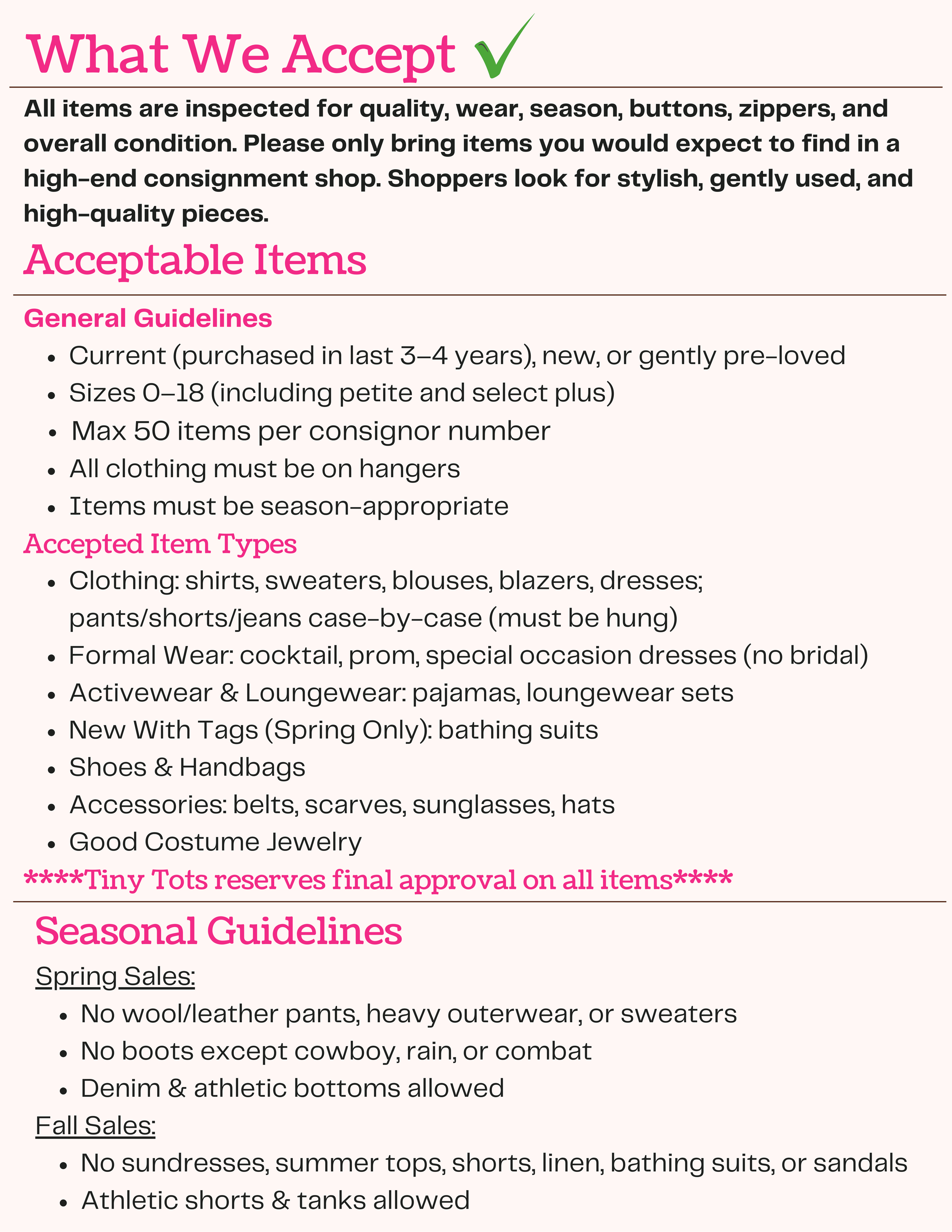
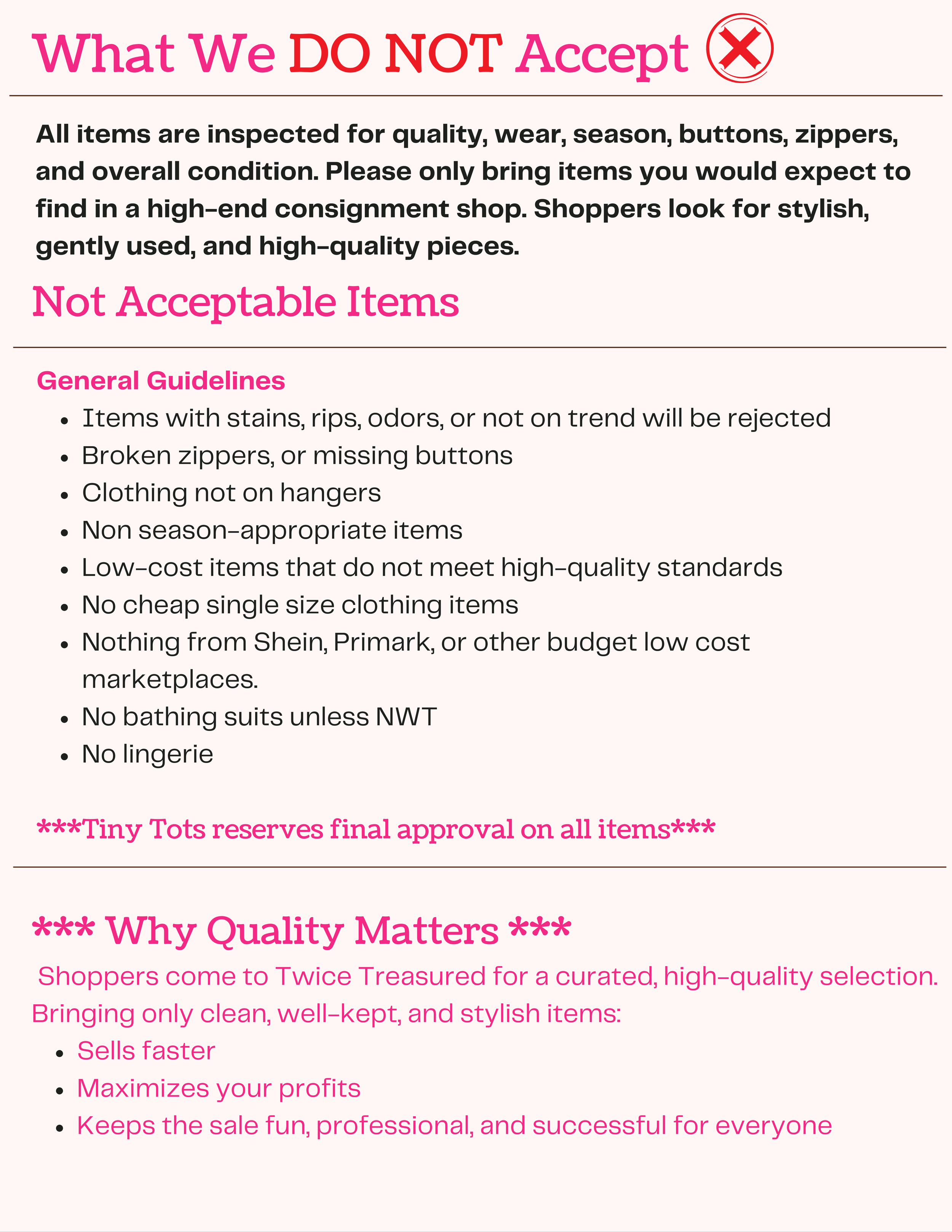
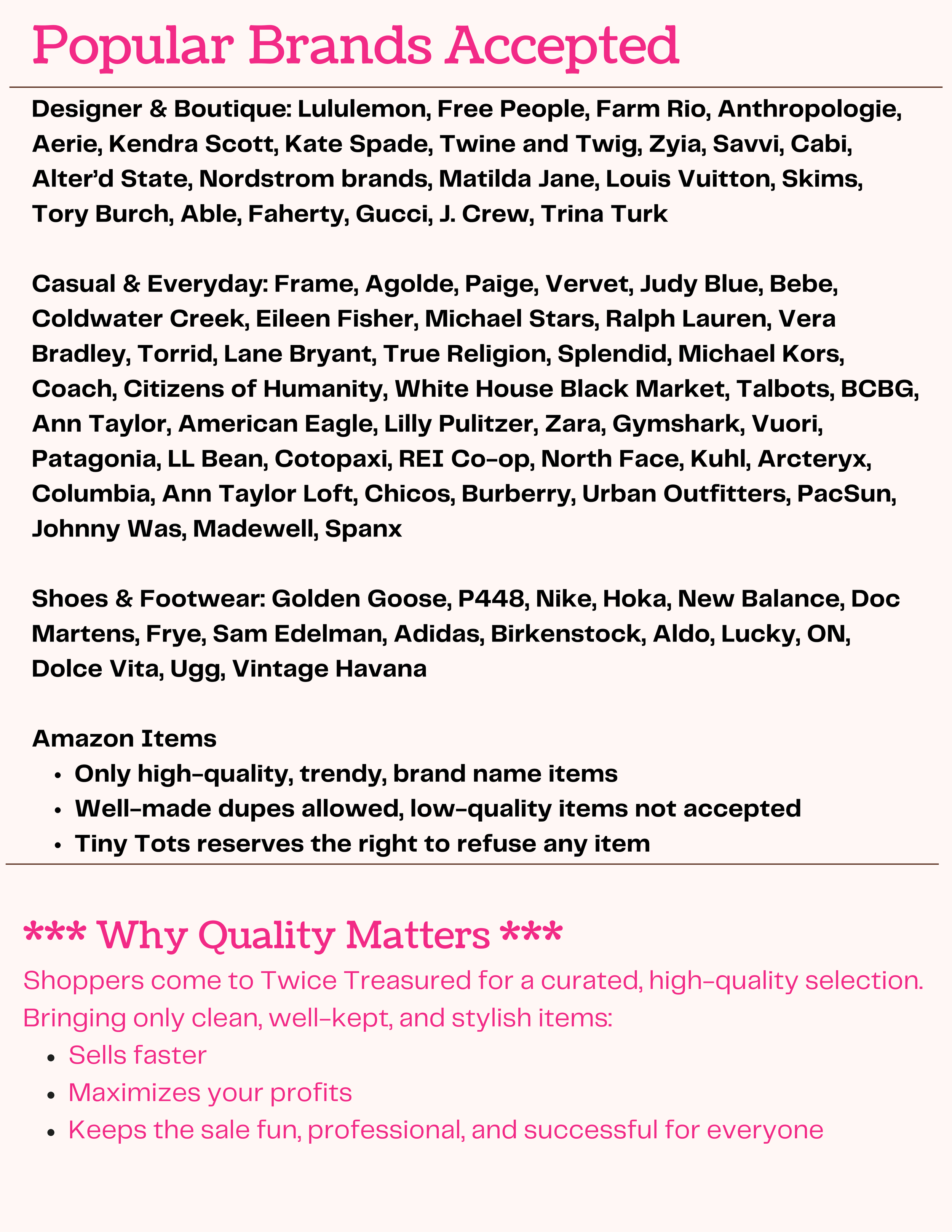
Review the accepted items list before tagging. Our Fall sale is reserved for fall and winter items only, and our Spring sale is reserved for spring and summer items only. Items not on the list will be returned at drop-off. If you have questions about an item, email us before tagging.
PREPPING & TAGGING ITEMS:
Please do not attach more than one tag per item: If your item contains more than one part/piece, describe all pieces/ parts on only one tag.
-
Please check your items for stains in a well-lit room. Items with stains may not be put out onto the sales floor.
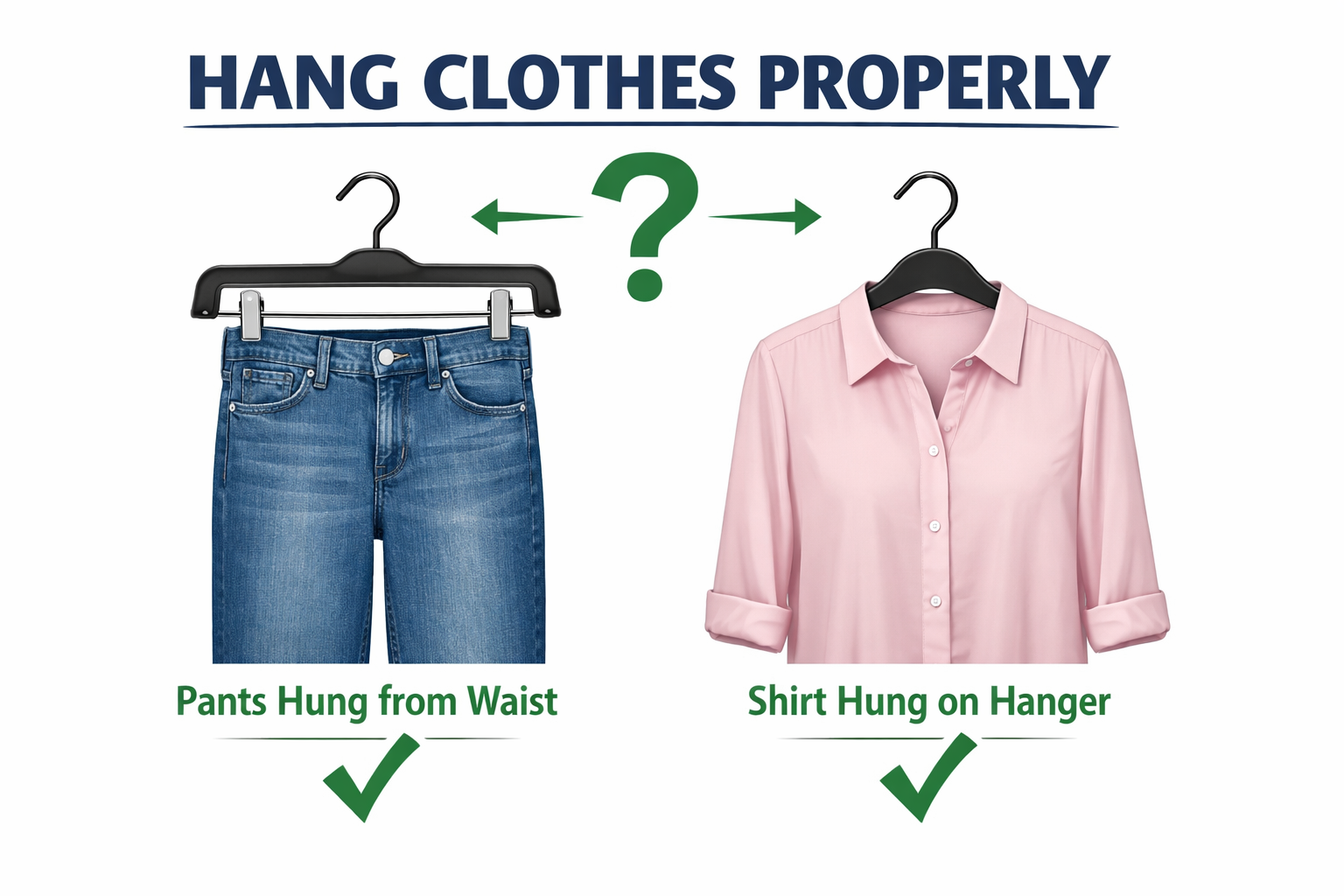
Attach the tag with a safety pin (no straight pins) to the upper right corner of the garment stated in our video. All clothing must be hung up on hangers. ***PANTS WILL NOT BE ACCEPTED if they are folded over the hanger. They must be hung as stating in our video.
DO NOT RUIN YOUR CLOTHES by putting holes anywhere but the seams with tagging barbs. We like tagging guns, but ONLY when used properly. Items not punctured
Try to sort in good lighting – we often catch stained items that we’d waste time tagging, if we weren’t by a window.
-
PREFERRED METHOD: Use a Zip tie to attach shoes together either through lace area, heel, etc.
We are VERY picky about shoes. Any shoes that have scuffs, or are very loved just do not sell.
Oddly enough, shoes in shoe boxes do not to sell well.
ITEMS TO HAVE ON HAND:
White (or light) cardstock (80-110lb paper for printing tags themselves)
Plastic Hangers
Safety Pins
WHAT’S ON THE TAG?
Our online tagging system allows sellers to enter all item details—size, description, price, and discount—then print tags at home. Each item is scanned at checkout using your unique barcode.
Tagging Guidelines
Price: $.50 increments only
Size: Must be clearly labeled
Consignor (Seller #): Automatically printed on all tags
Description: Clear item description (dress, capri set, shirt, shorts, etc.)
After the sale: You’ll receive a seller report showing which items sold once all tags have been scanned in the system.
PRINTING
You must use white card stock to print out the tags. No tags will be accepted on standard paper as they may get lost and/or torn.
When printing tags, the layout should default to 6 tags per page. Do not print using the “best” or “excellent” quality print option as this renders the bar codes unreadable by our scanners. If a change needs to be made to the tag once you have printed the tags, you MUST make the change in the tagging system and print a new tag!
WHAT DO WE LOOK FOR AT DROP OFF?
Quality control, Seasonality, Proper Tagging & Prepping
-
Gently worn or new Seasonal items within 0-18 sizes
We cannot accept items with stains, holes, or overly worn.
Zippers, buttons, and cleanliness.
Please mark the correct sizing of all items – hats, leggings, socks, etc. If it doesn’t have a size, it doesn’t sell
-
Shoes - soles, laces, zippers, all in working order
-
All articles should be clean, complete and in good working condition.
Please be highly selective and do not bring stained or worn out clothing or clothing missing buttons or with holes in it.
Please help us maintain a high standard of quality by only bringing items that you would want to purchase.
-
This process is simple and will make the TINY TOTS Sale efficient and accurate.
Please use ONLY CARDSTOCK TAGS! Please don’t use stickers, paper or write on ziplock bags.
Handwritten tags are not permitted.
Tags must be from our online tagging system.
DROP OFF & PICKUP INFO
You’ll need to grab a DROP OFF spot by selecting a time in the Seller Portal.
-
Have your items sorted by size before arriving.
Please check in at the Check-In table. You will need to confirm your seller number and info.
You’ll be placing your clothing directly on the main category tables.
We will confirm with you that your items are correctly tagged, hung and seasonal.
Any items that do not meet the quality guidelines will be refused or donated immediately at the end of drop off.
Remember: we WANT you to sell the most, and we don’t want to refuse anything, so please be super picky before you start tagging. Don’t waste time tagging items that can’t be accepted.
You do have the option of skipping Drop & Go and waiting up to 60 minutes to receive any rejected items back.
-
All unsold items are available to be picked up at the end of the sale.
You will collect any unsold items and ‘checkout’. If you need help locating any items we will help you locate it.
Be sure to check the ‘Lost and Found’ area to make sure none of your items were separated from the tag. Same for ‘Pulled for Quality’.
Unsold items that are not picked up will be donated to charity immediately at the end of the scheduled pick-up window.
If your items are not marked for donation and you fail to pick up, we have to assess a $20 fee to offset the extra cost of truck rental as well as a $30/per item fee for any items that are larger than a trash bag.
We regret that no alternate pick-up arrangements can be made. Please have a friend pick up your items if you are unable to do so.
We are not responsible for lost, damaged, or stolen goods. We are not responsible for unsold goods due to lost tags.
-
All sellers will be emailed TWO pases.
Spouses require a pass to enter the sale.
Only people with passes will be able to enter the Seller PreSale.
GETTING PAID:
After the sale, we calculate your earnings as 50% of the selling price on each item you sold. You will receive an echeck within 3 weeks. Lost checks will be re-issued, but an administrative fee will be added for the lost check and stop payment fees.
The Mother of All “How to Sell Instruction” (with painful detail)
We created this resource in case you’ve put the kiddos to bed and have a dedicated few minutes to work on selling, but a question pops up. Thus the over-the-top detail found below.
STEP by STEP INSTRUCTIONS
-
Register to be a seller, you will be charged a $20 non-refundable seller fee. Login to our online tagging system use your seller/consignor number and password.
Remember if you choose to mark as Donate any items that are unsold at the end of the sale your tags must be marked “D” for donation.
If you do not show up to sell, you will not be able to get your seller fee back. Seller fee is non-refundable.
-
Next, arrange your clothing items in order by size.
-
Click “Work With My Consigned Items”
-
Start entering your items:
Select category
Select size
Enter the description of the item. Be descriptive. It will help your item sell
Enter price – Must be in $.50 increments. As a general rule, price your items at 1/4 of the original retail price. If an item is like new and name-brand, you can price it higher. If an item has been well loved and not name-brand, it should be priced on the lower end. Also, if you are looking to not have to take anything home at the end of the sale, price your items to sell. Best to ask yourself, “What would I expect to pay for this item?” Price it no more than what you would be willing to pay.
Select Discount – Check the discount box if you want your item to be sold at half price on Saturday during the half price sale. If the box is not checked your item will not be sold at half-price and may miss its chance of being sold. Will show as red star on printed tag.
Select Donate – Check the donate box if you want your unsold items donated. All items with tags selected for donate, will be donated. Will show as “D” on printed tag.
NOTE: All items must be picked up by end of seller pickup regardless of what you indicated on the bar-coded tag.
Click the “Submit Item” button. Now all your information is entered into the online tagging system!
-
When you are ready to print your tags: Select one of the ‘Print Tags’ options from our online tagging system.
Please use only cardstock.
If you don’t have access to a printer which will print on cardstock then after printing on paper please staple your paper tags to index cards or cardstock. Also, EXTREMELY important, make sure the back of the tag is blank. If you print tags on both sides of the paper we have no way of knowing which item actually sold. Please remember to clean your printer heads and have adequate ink in your printer. If your tags print faintly they will not scan.
Finally, please make sure you are printing your tags full size, the default – 6 tags to a page, smaller tags do not scan and are also difficult for some of our elderly shoppers to read.*
*If you have any questions please contact us at hi@tinytotsconsignment.com. If the tags do not pop up in a new window, try turning off any popup blocker you may have running. If you are using Firefox, please print your tags using Internet Explorer. There are printing issues with our tags when printing from Firefox.*
-
You are ready to attach tags to your items!
NOTE: Tags may NOT have handwritten changes on price, discount, or donate. Make a new tag if you make a mistake or change your mind about a price or item description. You will NOT be able to make any changes to your tags once they are checked in to the sale. Changes made by hand will NOT be accepted at check-out lanes.
-
Cut your printed tags.
Attach with pins or tape (blue painter’s is ideal).
PLEASE DO NOT TAPE OVER BARCODES if you can help it.
-
Pack up like with like and load the car for drop off day.
DONE - pour a glass and enjoy the space you made! echeck will arrive soon!